sample-addon
extension
Sample add-on — starter template showing a settings pane, keychain secret, SQLite KV config, and a test endpoint
Starter template for piclaw add-on developers. Demonstrates the core patterns every settings-aware add-on needs.
Requires Piclaw >=2.0.0.
Open Settings → Add-Ons and install sample-addon from the catalog.
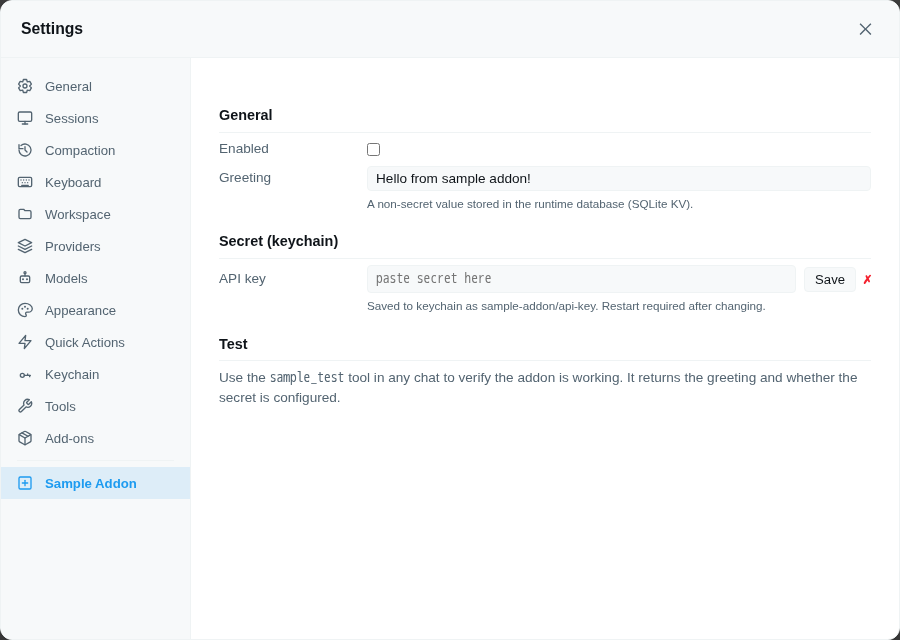
Registers a Settings → Sample Addon pane with:
web/index.tsGET / POST /agent/addons/api/sample-addon/configThe browser pane is just a local authenticated client of piclaw itself:
await fetch("/agent/addons/api/sample-addon/config");
await fetch("/agent/addons/api/sample-addon/config", {
  method: "POST",
  headers: { "Content-Type": "application/json" },
  body: JSON.stringify({ enabled: true, greeting: "Hello" }),
});The pane uses the host's settings-addon-* field, label, help, control-group
and status classes. Hosts with the Settings authoring contract from Piclaw #1318
supply same-skin styling; web/styles.ts keeps older supported hosts readable
using a pane-scoped CSS layer with lower priority than host styles. Configuration
and keychain behaviour are unchanged. Password and Save remain in the same
control group; secrets never enter the config API.
The runtime entry registers config handlers directly with piclaw:
const registerAddonConfigApi = globalThis.__piclaw_registerAddonConfigApi;

registerAddonConfigApi?.("sample-addon", "config", {
  get: async () => loadConfig(),
  set: async (payload) => handleSetConfig(payload),
}, import.meta.dir);
Piclaw lazily loads installed add-on runtime entries on first config request, so the settings pane works without a slash-command bridge.
All non-secret config is stored in the extension KV store (SQLite, global scope):
import { createExtensionStorage } from "./compat/extension-kv.js";

const kv = createExtensionStorage("sample-addon");
kv.set("config", { enabled: true, greeting: "Hello" }, "global");
const cfg = kv.get("config", "global");
The compat shim (compat/extension-kv.ts) resolves the runtime's KV store automatically. Copy it from this addon when creating a new one.
The settings pane saves secrets via POST /agent/keychain:
await fetch("/agent/keychain", {
  method: "POST",
  headers: { "Content-Type": "application/json" },
  body: JSON.stringify({ name: "sample-addon/api-key", secret: "sk-...", type: "token" }),
});
The runtime auto-injects keychain entries as environment variables — sample-addon/api-key becomes $SAMPLE_ADDON_API_KEY in process.env after restart.
The sample_test tool returns the configured greeting and whether the secret is present, so you can verify the addon is wired correctly:
> use sample_test
Greeting: Hello from sample addon!
Secret configured: yesThis add-on includes tests/features/settings.feature plus Playwright step definitions under tests/steps/.
The add-on catalog's E2E harness turns those Gherkin scenarios into runnable Playwright tests and, in CI, publishes a PDF/HTML report with the package and add-on page.
The scenarios require the UI to save successfully; their API reads only verify
persistence, and cannot substitute for a failed UI save. settings-browser.test.ts
also tests mocked config/keychain requests and errors with no live server. From
the repository root, opt in with PICLAW_E2E_DISPOSABLE=1,
PICLAW_SETTINGS_CORE_SOURCE=/absolute/path/to/piclaw and an installed
PLAYWRIGHT_BROWSERS_PATH, then run bun test addons/sample-addon/settings-browser.test.ts.
| What | Where |
|---|---|
| API key / secret | Keychain — entry sample-addon/api-key (entered in settings pane) |
| Enabled, greeting, other config | Runtime database — extension KV store (SQLite, global scope, extension ID sample-addon) |
No config files are written to disk.
addons/sample-addon/
├── package.json          # Addon manifest
├── index.ts              # Extension entry: direct config API, KV config, keychain secret, test tool
├── web/index.ts          # Settings pane: checkbox, text, password, keychain save
├── web/styles.ts         # Pane-scoped older-host fallback styles
├── compat/extension-kv.ts # KV store compat shim (copy to your addon)
├── tests/                # Gherkin UX tests and Playwright step definitions
└── README.md # This fileaddons/your-addon/sample-addon → your-addon in package.json, index.ts, and web/index.tsaddons/your-addon/assets/, then reference it from the README. For Linux environments, prefer an overlayfs-based clean fixture, show only the target pane during the screenshot, and restore the state afterward.bun run scripts/sync-catalog.ts --write to update the catalog