
imap
extension
IMAP email management tool — search/fetch, move/copy, flag, create drafts, file messages, and STARTTLS support
Requires Piclaw >=2.0.0.
Open Settings → Add-Ons and install imap from the catalog.
IMAP email management addon for piclaw.
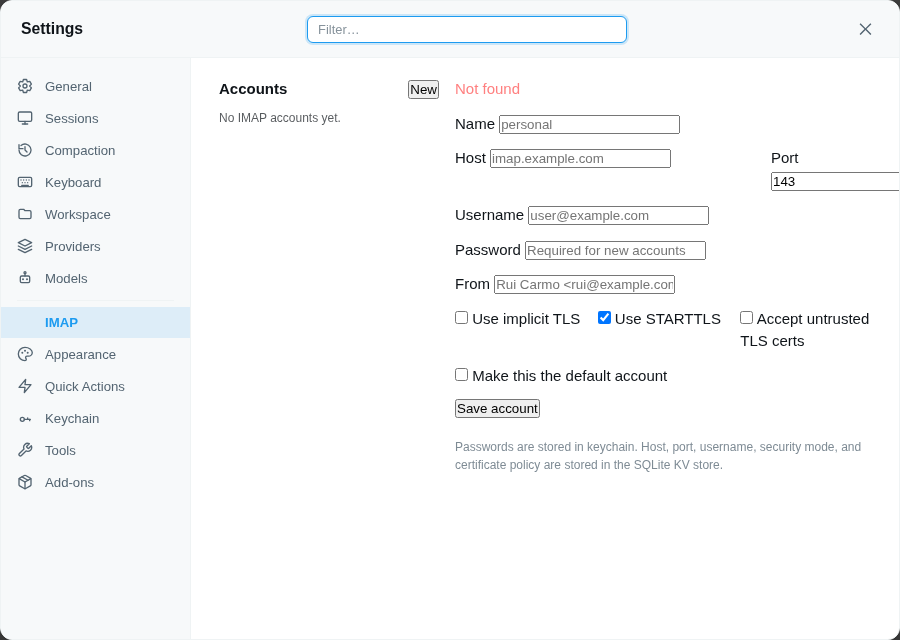
Includes a web settings pane for managing accounts.
APPEND993) or STARTTLS (143)Use this addon when you want Pi to:
It is not an SMTP sender or a full mail client.
Non-secret account settings are stored in the extension SQLite KV store:
tlsstarttlsallowInsecureTlsPasswords are stored in keychain only:
imap/<name>/passwordThe settings pane supports:
namehostportuserpasswordfromtlsstarttlsallowInsecureTlsUse:
tls: true993Use:
tls: falsestarttls: true143Use:
tls: falsestarttls: falseOnly sensible on a trusted LAN.
allowInsecureTls: true disables certificate verification for that account.
This covers:
Use it only when necessary.
In addition to the settings pane, the imap tool supports:
list_accountsget_accountsave_accountdelete_accountset_default_account{
"action": "save_account",
"account": "local",
"host": "192.168.1.250",
"port": 143,
"user": "rcarmo",
"pass": "...",
"tls": "false",
"starttls": "true",
"allowInsecureTls": "true",
"setDefault": "true"
}The same tool also supports:
list_folderssearchfetchmovecopyflagcreate_draftfile_messagecreate_folderdelete_folder{
"action": "list_accounts"
}{
"action": "search",
"account": "local",
"folder": "INBOX",
"seen": "false",
"limit": 20
}{
"action": "fetch",
"account": "local",
"folder": "INBOX",
"uids": "12345",
"withBody": "true"
}{
"action": "create_draft",
"account": "local",
"draftTo": "someone@example.com",
"draftSubject": "Test draft",
"draftBody": "Hello from Pi"
}In your current local setup:
993 was closed143 workedSo the working temporary config was:
{
  "host": "192.168.1.250",
  "port": 143,
  "user": "rcarmo",
  "tls": false,
  "starttls": true,
  "allowInsecureTls": true,
  "from": "rcarmo"
}
Once the certificate is renewed, allowInsecureTls should be set back to false.
APPEND.dryRun where appropriate.delete_folder requires confirm=true.